
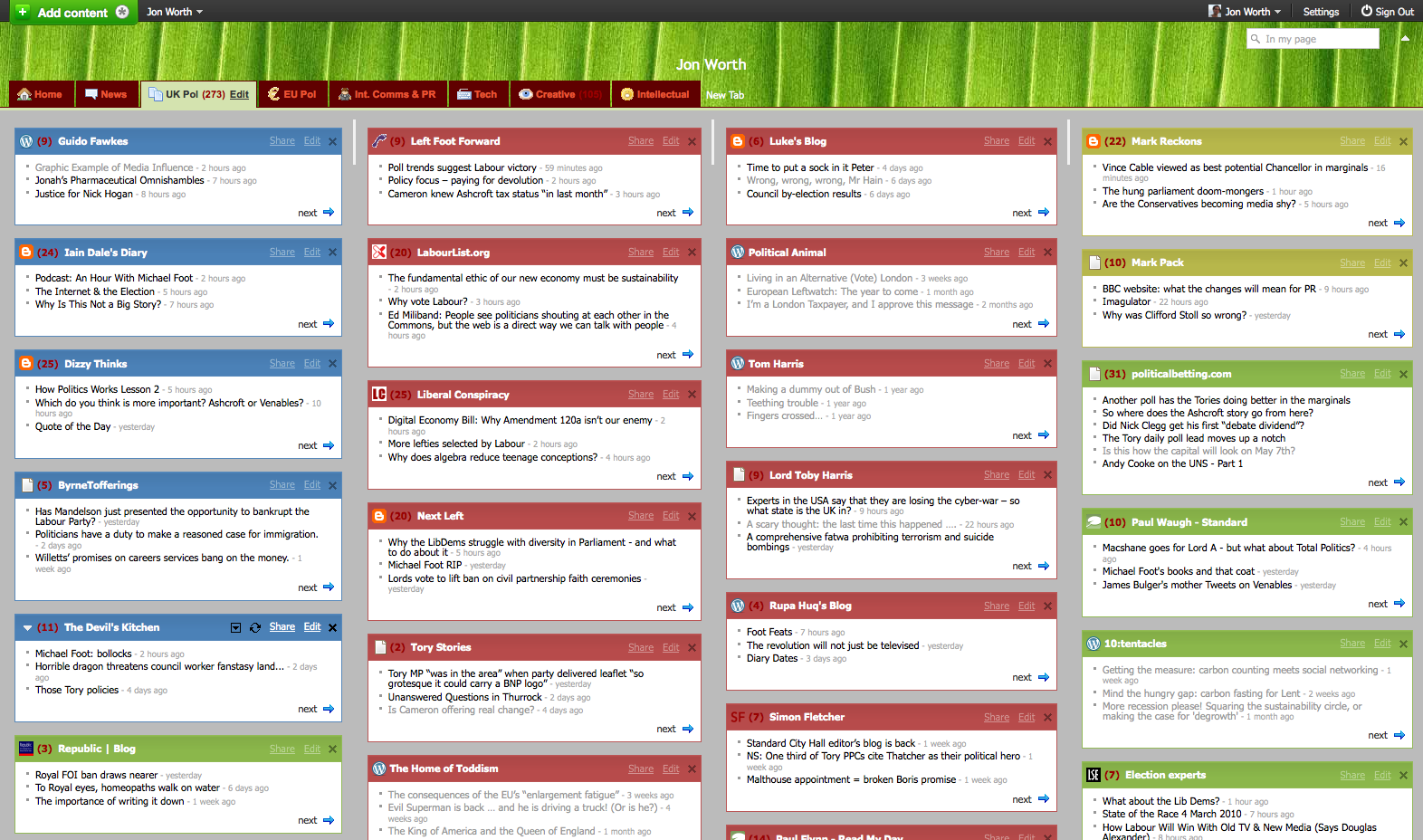
I ran a workshop on online campaigning in Brussels last night, and in the initial round of introductions I asked the participants if they blogged, were on Facebook, on Twitter, or used RSS. A couple of people said they ‘didn’t have time for RSS‘. I was flabbergasted. How do you have time if you don’t use RSS?
So hence this blog entry aims to set things straight about this brilliant technology that’s promoted by no-one and hence does not get the credit it deserves.
Essentially if you use the internet to get your news in the regular way, visiting different websites in turn, you’re not time efficient. Pages take a while to load, you have to browse around for the sections you want to read. Even if you have sites open in multiple tabs in a browser you still have little overview to compare sources. So in short you waste time.
RSS solves all of that, by grouping together the content you want, in the way you want it, and – subtly – keeping it up to date.
To use RSS you need a RSS reader – web based ones are best so you can use them on any machine anywhere. I personally favour the elegant Netvibes over Google’s Reader, although both do the job. A guide to how to add a feed to Netvibes is here, and how to do it in Google Reader is here.
 To this RSS reader you add RSS feeds – feeds are normally indicated with the little orange logo shown here to the left. When website content is updated, the RSS feed is also updated and you see the new stories in your RSS reader, normally in bold. Have a look at the screenshot above to see how it can look.
So how would you use this in practice?
Imagine you’re working on EU affairs. You might create a list of RSS feeds with the latest news about EU politics – from The Economist (RSS for ‘European Union’ subject), the FT (by sector or by region), EUObserver (feed logo top-right of their site) and euro|topics (RSS in the right sidebar). You might then add some sector specific feeds – the industry publications for the issues you work on for example. So in a couple of tabs in your RSS reader you have all the news you need at your fingertips, organised your way.
If you’re a blogger or activist then it’s even more important. As the screenshot above shows I keep an eye on about 20 UK political blogs on an everyday basis, and the same number of EU blogs, tech blogs and all kinds of others. Any decent blog will have RSS feeds, and quite often many different ones. Here for example you can follow Euroblog, Sportblog, even uniquely what I’ve been writing about Eurostar – all via RSS.
I don’t read each and every entry of every blog I follow, but I do read whatever has a title that catches my eye, so the header needs to be clear and descriptive. I could never visit even 20 blogs, let alone 100, on an everyday basis but RSS allows me to maintain a sense of perspective.
So if you are not using RSS yet, why not? It will allow you to keep an eye on more sources of information, more efficiently than you ever have before. Invest a little time learning how to use it and your engagement will be paid back many times over.
(P.S. Apologies to all blog readers who have come across this entry because they follow my blog via RSS – send a link to friends who are RSS-sceptics!)
Hey,
Great Blog! I have got to know some useful Ideas. I really like the way you have explained Each and everything in Detail.
Thank you for sharing it looking forward to reading more Blogs from you.
Thanks and Regards,
Machinesaver
We do our best to keep the RSS-feeds on eeas.europa.eu up and running! We learned that journalists and others are using these to follow our news (and not necessarily our Twitter).
@Eleanor – there are 3 RSS links there. Click ‘Euroblog’, ‘Sportblog’ or ‘Both blogs’. I didn’t want to have to put 3 orange logos!
Maybe I’m being an idiot as only just getting the hang of this RSS thing but your RSS button on the top of your page doesn’t work so I can’t get your feed address – I wanted to add your blog to my netvibes!
I’m sort of an RSS-aholic and follow your blog via the RSS feed.
I use Brief, a nifty Firefox plugin. Since Firefox 3.6 the problem of a large number of RSS feeds seriously undermining FF performance has been overcome, so I’m a happy Brief user these days.
Sometime end of March it will have to be… Am in London next week but only for a super quick visit, no time for a beer then sadly! 🙁
Thanks, Jon. When you’re next in London, do claim a beer from me!
Although many websites have stopped using full RSS feeds and are now just displaying the partial text, that doesn’t stop people from getting the full RSS feed.
You can use WizardRSS.com to the full RSS feed from any website.
I have seen plenty of people create blogs, websites, forums, etc. and use WizardRSS to make it fully automated. They make a killing off Adsense!
WizardRSS: http://www.wizardrss.com
Colour coding in Netvibes:

RSS for tags, or indeed RSS for basically anything… this is super simple in WordPress, if you have the pleasant permalinks working (i.e. /something-sensible rather than ?p=1763). All you then have to do is add /feed to the end of the URL. So the page with all entries tagged ‘Eurostar’ is:
http://www.jonworth.eu/tag/eurostar/
and hence the feed is:
http://www.jonworth.eu/tag/eurostar/feed/
Yahoo Pipes is ace to do these sorts of things, and you can also create a Netvibes Universe as well, essentially a public listing of chosen RSS feeds.
I forgot to mention, some people swear by Pageflakes, too – it seems very like Netvibes to me.
I follow you by RSS too, Jon. You’re quite right, and I agree with you about Netvibes, too – I must find out how you do that colour-coding.
Also, is it easy to create that tagged feed you’ve done for Eurostar? That could be an immensely useful thing.
Don’t forget either how we can make websites useful for our readers by building in RSS feeds, Pipes or whatever so that they can find the news they’re interested in on sites they like. I want to learn how I can use them to provide legal news for my readers, for instance.
OF COURSE, I follow you via RSS, I have no idea how anyone could possibly manage without.
There are colours for the EU blogs, but no rationale to it whatsoever… Categorisation by colour for the UK blogs is much easier! 🙂
I notice you’ve colour-coded your UK Politics blogs according to party sympathies, btw. How have you arranged your EU politics tab? 😀 By EP group?
RSS is a thing of beauty. It lets you create your own magazine with the content you want. And with the PubSubHubbub (PuSH) protocol increasingly supported, you get everything in real-time.
This sort of simple explanation of RSS should be hosted on a dedicated page on every website.