A friend working for a Swedish NGO asked me whether it would be possible to keep an eye on Facebook Groups from within a Netvibes Universe. Seems like a good idea as going to each group in turn to see what’s being discussed is a bit of a headache. But how are you supposed to do that when there is no RSS feed for a Facebook Group?
The solution is to use a Yahoo Pipes page developed by Jason Silver to create a RSS from the Facebook API. You just need the Group ID for the Facebook Group. So, for example, the Flying Spaghetti Monster Bus Campaign group has the URL: http://www.facebook.com/group.php?gid=84944630850 This means the Group ID is 84944630850. Stick that in the Yahoo Pipes page, and you get a screen that looks like this:
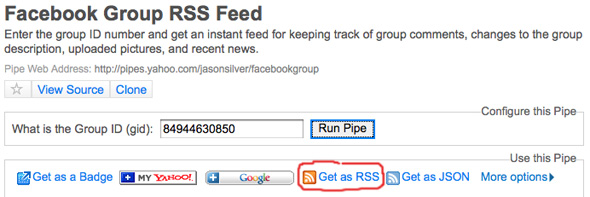
So what are the limitations? The RSS feed only gives you information about the Discussion Board posts in the Facebook Group. It does not give you RSS of the wall.
Please do let me know your experiences managing to get this to work!
(Oh, and while I’m at it on interesting uses of Netvibes: keep an eye on the status of your servers in Netvibes via a free RSS feed from Montastic)
The *ONLY* working solution which is still free is to use Wallflux free account and then clean the resulting RSS with FeedRinse.com. Just add one filter to get rid of that anoying Wallflux ad. Done.
The pipes dont work anymore, try http://groupfeed.climatesceptics.org/ instead?
Hi: I have been trying to use this Pipes app to follow several facebook groups for a while now, and I find it doesn’t really work. It seems to list the same 1st two posts over and over as repeated posts, in most of the groups I am trying to track. Occasionally it does work, but generally not.
I am using Google Reader as my RSS feed, which may be part of the problem?
I’m wondering if there is a authentication piece that the pipes application wants you to be logged into your profile so it can get proper access to the group, which Google Reader would be unable to do..
Thanks for any feedback..
– stefan
That is a very neat little trick–getting a feed of discussio forum posts might actually give me a reason to get involved more in some of my groups.
It works! Thanks for the tip!